Your developer setup
How to study this week. These written lessons are the whole course. There are no videos, so everything you need is on this page. Read one lesson per day, following the day-by-day plan. Type every code block into your own editor and run it; don't copy-paste. Then do the Try it exercise before you move on. Reading time: about 3 hours in total. Practice time: 6–8 hours.
What you'll build by Sunday: a command-line expense tracker that saves your spending to a file and is published on GitHub.
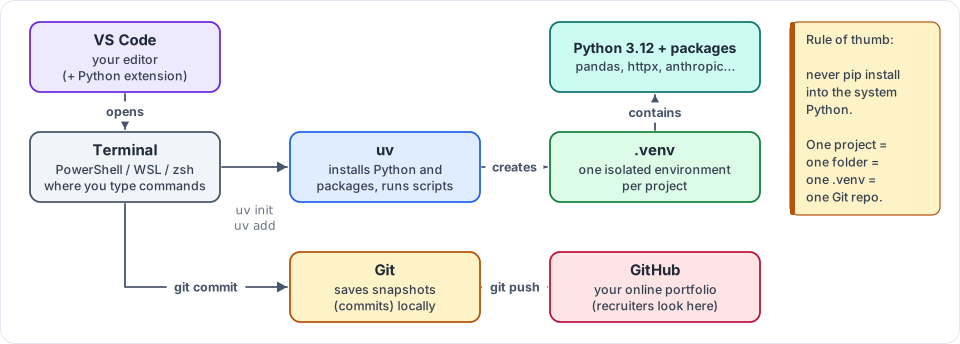
Figure 1.1: The five tools you install on Day 1, and how they fit together. Every later week assumes this setup.
What an AI engineer's laptop needs
Every professional AI engineer, whether at a startup in Bengaluru or at Google, uses the same four tools:
| Tool | What it does | Install |
|---|---|---|
| Terminal | A text window where you type commands instead of clicking | Built into macOS/Linux. On Windows install WSL2 + Ubuntu (below) |
| VS Code | The editor where you write code | code.visualstudio.com, plus the Python and Ruff extensions |
| Git + GitHub | Git saves versions of your code; GitHub stores them online as your public portfolio | git-scm.com, github.com |
| uv | Installs Python and packages, and gives every project its own isolated environment | one command (below) |
Step 1 (Windows only): install WSL2
Most AI tooling (Docker, vLLM, many tutorials) assumes Linux. WSL2 runs a real Ubuntu Linux inside Windows.
- Open PowerShell as Administrator and run
wsl --install. - Restart when asked. Ubuntu opens and asks you to choose a username and password. Remember the password, because you'll need it for .