Git and GitHub
The idea
Git records snapshots of your project called commits. Each commit stores what changed, who changed it, when, and a message saying why. You can always go back to any snapshot. GitHub is a website that stores a copy of your commits online, so your work is backed up and recruiters can see it.
A file you change moves through three places:
The staging area lets you choose which changes go into the next snapshot, so one commit can be "fix the total bug" even if you also edited another file.
One-time setup
To push to GitHub from the terminal you need to log in once. The easiest way is the GitHub CLI: install gh (cli.github.com), then run gh auth login and follow the prompts.
The everyday loop
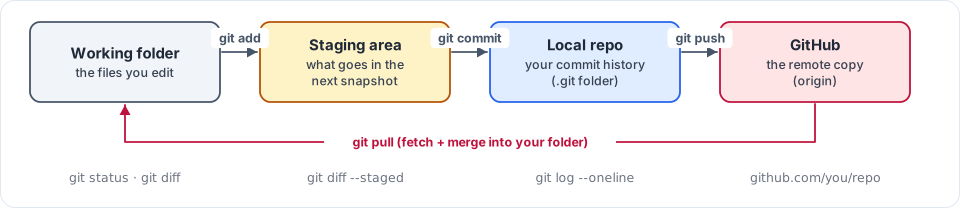
Figure 1.2: Git's everyday loop: edit → git add (stage) → git commit (snapshot) → git push (share). git pull brings others' work back.
To publish the project on GitHub for the first time:
After that, publishing new commits is just git push.
commitsaves a snapshot on your laptop.pushuploads your commits to GitHub. If you commit but never push, nobody (including your future self on another laptop) can see your work.