§ 1.7section 7 of 16·~11 min
Collections: lists, tuples, sets, dicts
Real programs handle many values. Python has four built-in containers, and choosing the right one is half of good code.
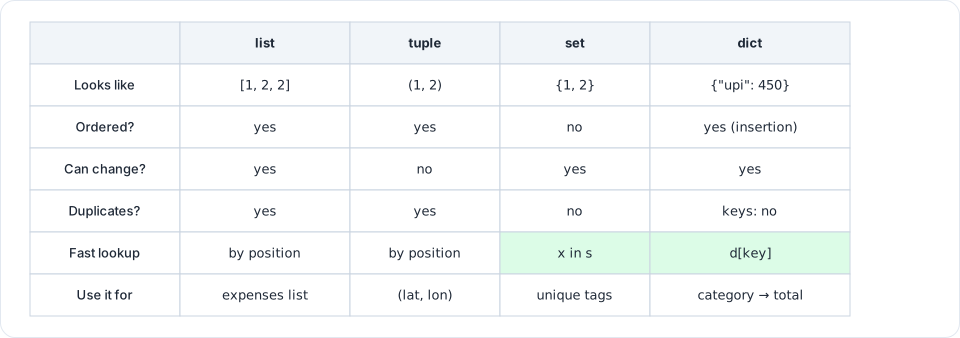
Figure 1.4: Pick the collection by the question you need to answer: in order? can it change? duplicates? look up by key?
cities = ["Pune", "Delhi", "Pune"] # list: ordered, changeable, allows duplicates
point = (12.97, 77.59) # tuple: ordered, NOT changeable (immutable)
unique = {"Pune", "Delhi"} # set: no duplicates, very fast "is x in it?"
salary = {"fresher": 6, "sde2": 18} # dict: key → value lookup
| Need | Use |
|---|---|
| An ordered collection you'll add to | list |
| A fixed record that shouldn't change (coordinates, RGB) | tuple |
| Remove duplicates, or check membership fast | set |
| Look something up by name or ID | dict |
Lists
cities.append("Chennai") # add to the end
cities.insert(0, "Mumbai") # add at a position
cities.remove("Delhi") # remove the first match
last = cities.pop() # remove and return the last item
len(cities)
cities[0], cities[-1] # first and last
cities[1:3] # slice
sorted(cities) # a new sorted list
cities.sort(reverse=True) # sort in place
"Pune" in cities # True
Lists are mutable: if two variables point to the same list, a change through one shows up in the other. Use new = old.copy() when you need a separate copy.
Dicts: the most important structure in AI work
Every LLM API request and response is JSON, and JSON objects become Python dicts. You'll read and build dicts every day.
expense = {"amount": 250.0, "category": "food", "note": "chai + samosa"}
expense["amount"] # 250.0
expense["tip"] # KeyError: the key doesn't exist
expense.get("tip", 0) # 0 (a safe lookup with a default)
expense["amount"] = 300 # update
expense["paid_by"] = "UPI" # add a new key
del expense["note"] # remove
for key, value in expense.items():
print(key, "→", value)
list(expense.keys()), list(expense.values())