§ 1.4section 4 of 16·~10 min
Variables, types, input and output
Variables are labels
A variable is a name that points to a value. Python works out the type from the value, so you don't declare it.
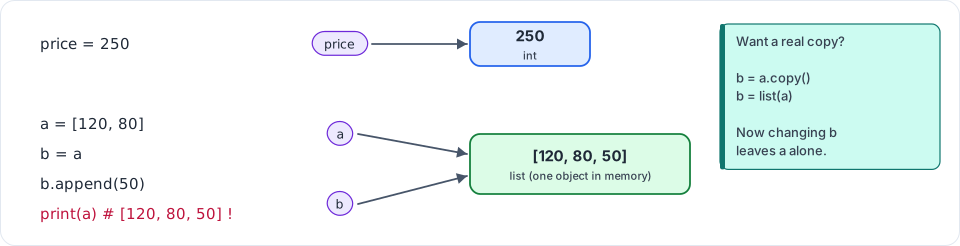
Figure 1.3: Names are labels on objects, not boxes. b = a does not copy the list; both labels point to the same object.
name = "Priya" # str (text)
age = 22 # int (whole number)
cgpa = 8.4 # float (decimal number)
is_placed = False # bool (True or False)
nothing = None # NoneType ("no value yet")
print(type(age)) # <class 'int'>
Naming rules: use lowercase with underscores (monthly_budget, not MonthlyBudget or mb). Names can't start with a digit. Choose names that say what the value means.
Operators
10 + 3 # 13
10 - 3 # 7
10 * 3 # 30
10 / 3 # 3.3333333333333335 (/ always gives a float)
10 // 3 # 3 (floor division: drop the remainder)
10 % 3 # 1 (remainder: "is it even?" → n % 2 == 0)
2 ** 10 # 1024 (power)
"chai" + "wala" # "chaiwala" (joining strings)
"ha" * 3 # "hahaha"
Comparisons give a bool: == (equal), !=, <, >, <=, >=. Combine them with and, or, not.
Floats are approximate. 0.1 + 0.2 gives 0.30000000000000004, because computers store decimals in binary. For display, round the number (round(x, 2)). For real money in production systems, use decimal.Decimal or store paise as integers.
Strings and f-strings
city = "Pune"
city.upper() # "PUNE"
city.lower() # "pune"
" hi ".strip() # "hi" (removes spaces at both ends: use it on every input)
"a,b,c".split(",") # ["a", "b", "c"]
"-".join(["a", "b"]) # "a-b"
"Pune" in "Pune, MH" # True
len(city) # 4
city[0] # "P" (indexing starts at 0)
city[-1] # "e" (negative index counts from the end)
city[1:3] # "un" (slice: from index 1 up to, NOT including, 3)